General
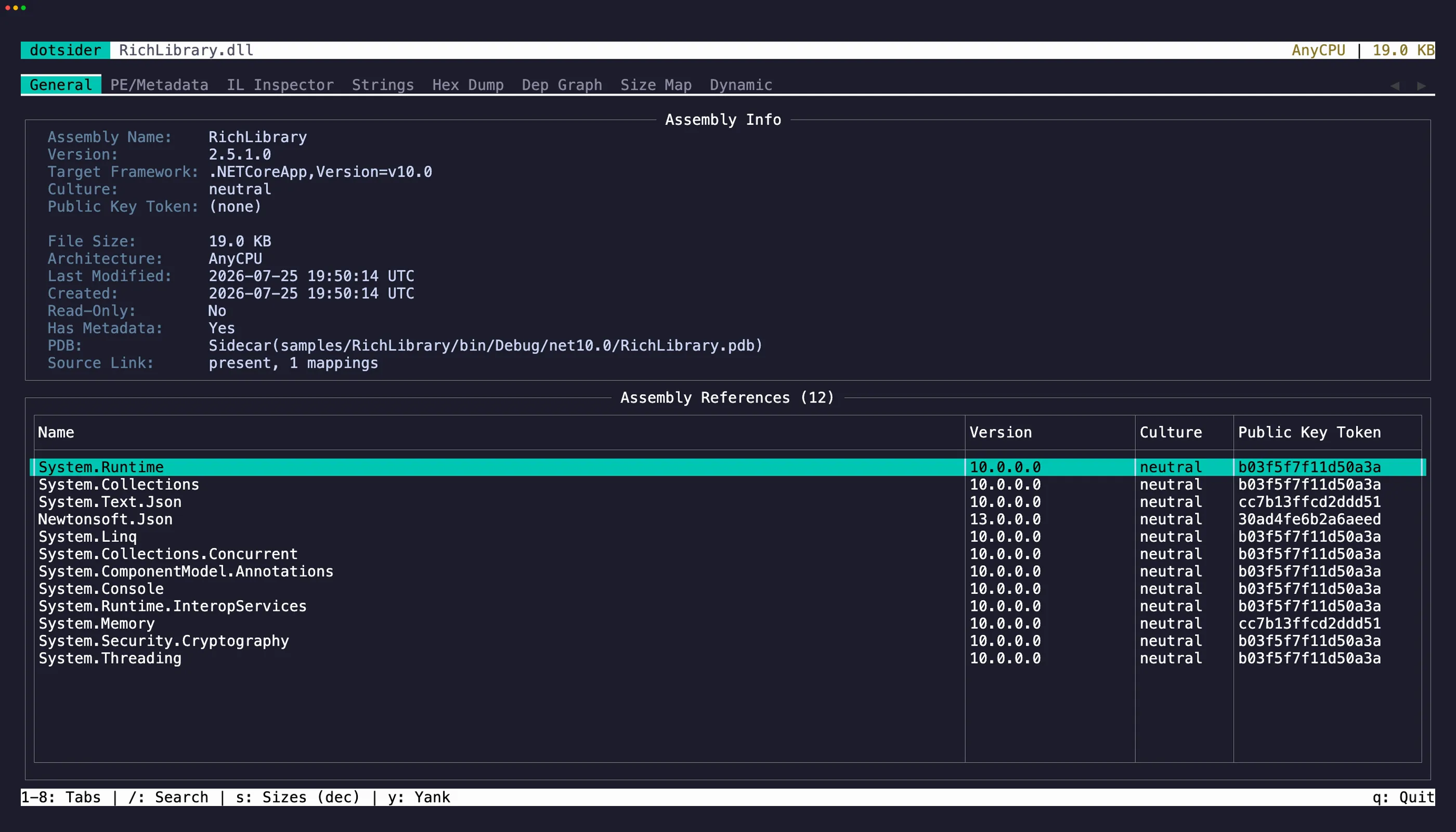
The General tab (1) is the first thing you see when opening an assembly. It shows:
- Assembly identity — name, version, culture, public key token
- Target framework — which .NET version the assembly targets
- Architecture — AnyCPU, x64, ARM64, etc.
- PDB summary — whether portable debug information came from a sidecar, an embedded PDB, or was unavailable
- Dependency table — all referenced assemblies with their versions
Native AOT binaries
Section titled “Native AOT binaries”Opening a Native AOT executable adds a block below the standard fields. ILC strips ECMA-335 metadata, but every AOT image embeds a ReadyToRun header the runtime uses to find its module sections — dotsider validates that header and reports:
- Binary kind —
Native AOT (.NET) - ILC / RTR format — the ReadyToRun format version, section count, and header offset
- Runtime version — recovered from a version string the runtime pack embeds; shown as
(not detected)when the layout doesn’t match (a heuristic, never a guess) - Native imports — module and function counts from the native import table (the full table lives in the PE/Metadata tab)
- R2R sections — how many ReadyToRun runtime sections the header describes (the table is in the PE/Metadata tab)
- Recovered types — type and method counts recovered from the embedded metadata (the list is in the PE/Metadata tab)
- Frozen strings — how many frozen string literals were recovered (the list is in the Strings tab)
- Native symbols — the symbol count and its source (native PDB, DWARF, or dSYM), or — when none loaded — the reason: missing, identity mismatch, corrupt, or boundaries-only fallback (the table is in the PE/Metadata tab). Native DWARF materialization from ELF images and dSYM bundles is limited to 256 MiB per symbol read. Malformed line metadata omits source locations from otherwise readable symbols; oversized or wholly unreadable data is treated as corrupt and falls back to unwind boundaries when available. Native PDB MSF directories and CodeView module ranges are validated before materialization; malformed PDBs are reported as corrupt and use
.pdataboundaries when available.
ReadyToRun images
Section titled “ReadyToRun images”A ReadyToRun (crossgen2) image keeps its full metadata and adds precompiled native bodies, so the standard fields stay and a ReadyToRun block is added, reporting the format version and status (Valid, Corrupt, or UnsupportedVersion — a broken header is surfaced, never hidden), the architecture, whether the image is a composite or a component (and its owner), and how many methods are precompiled. Inspect a method’s native code in tab 3’s IL + Native view or via --r2r-correlate.
WebAssembly modules
Section titled “WebAssembly modules”Opening dotnet.native.wasm from a browser-wasm publish adds a WebAssembly (.NET) block. The module has no ECMA-335 metadata of its own, so the dependency table is empty, but the General tab reports the Wasm version, section count, type/table/memory/global counts, element and data counts, the start function when present, defined/imported functions, code and data sizes, import/export counts, and whether dotnet.native.js.symbols was loaded for function names. Structured vectors are checked against their containing bytes and a shared 1,048,576-item budget before allocation. Malformed standard data leaves the safely decoded prefix visible and adds a Note explaining where parsing stopped. Function symbols and disassembly live in tab 3 and the PE/Metadata Symbols sub-tab.
Opening a Webcil app assembly from the same publish, for example _framework/MyApp.wasm, keeps the normal managed assembly view. The General tab adds a compact Managed Webcil (.NET) block showing the Webcil version, whether the payload was Wasm-wrapped, section count, and metadata size, while dependencies, metadata tables, IL, PDBs, and Source Link behave like any other managed assembly.
Text selection and copy
Section titled “Text selection and copy”The Assembly Info panel is a read-only editor. Click into it or press Tab to move focus there, then select text with click-drag or Shift + arrow keys. Press y to yank the selection to the clipboard.
You can also use vim-style text objects: iw selects the word under the cursor, iW selects a whitespace-delimited WORD (handy for grabbing a version string or assembly name in one keystroke). yiw and yiW select and copy in one motion. V selects the entire line and yy copies it directly.
On the dependency table, focus a row and press y to copy it as tab-separated values. Press Tab to cycle focus between the info panel and the table.
Drill into references
Section titled “Drill into references”Select any row in the dependency table and press Enter. For .NET Core / .NET 5+ assemblies, dotsider searches the app directory, NuGet’s global packages folder using the assembly’s .deps.json, the runtime directory, any single-file bundles in scope, and the .NET shared framework. Package and asset paths from .deps.json must resolve inside the named package; rooted, traversing, or link-redirected paths remain unresolved. For .NET Framework targets it walks the framework binder — app.config redirects, GAC, the framework runtime directory, configured <codeBase>, then the application base and <probing privatePath> — so drill-in lands on the same file the runtime would load. CLR 4 roots (net40 – net48) bind out of Microsoft.NET\assembly\GAC_* and the v4.0.30319 runtime; CLR 2 roots (.NET Framework 2.0 / 3.0 / 3.5 SP1, detected from the mscorlib v2 reference) bind out of %WINDIR%\assembly and the v2.0.50727 runtime. Press Esc to return.
This lets you walk an entire dependency chain without leaving the TUI — into framework assemblies like System.Runtime or mscorlib, into assemblies bundled inside a self-contained single-file executable, or into a redirected dependency whose loaded version differs from the version its metadata recorded.
For CLR 2 roots the assembly’s TargetFrameworkAttribute is typically absent (the attribute didn’t exist before .NET 4.0), so the General tab shows an inferred-runtime label rather than (unknown), and the Dynamic tab correctly identifies the assembly as .NET Framework so EventPipe tracing isn’t offered.