PE / Metadata
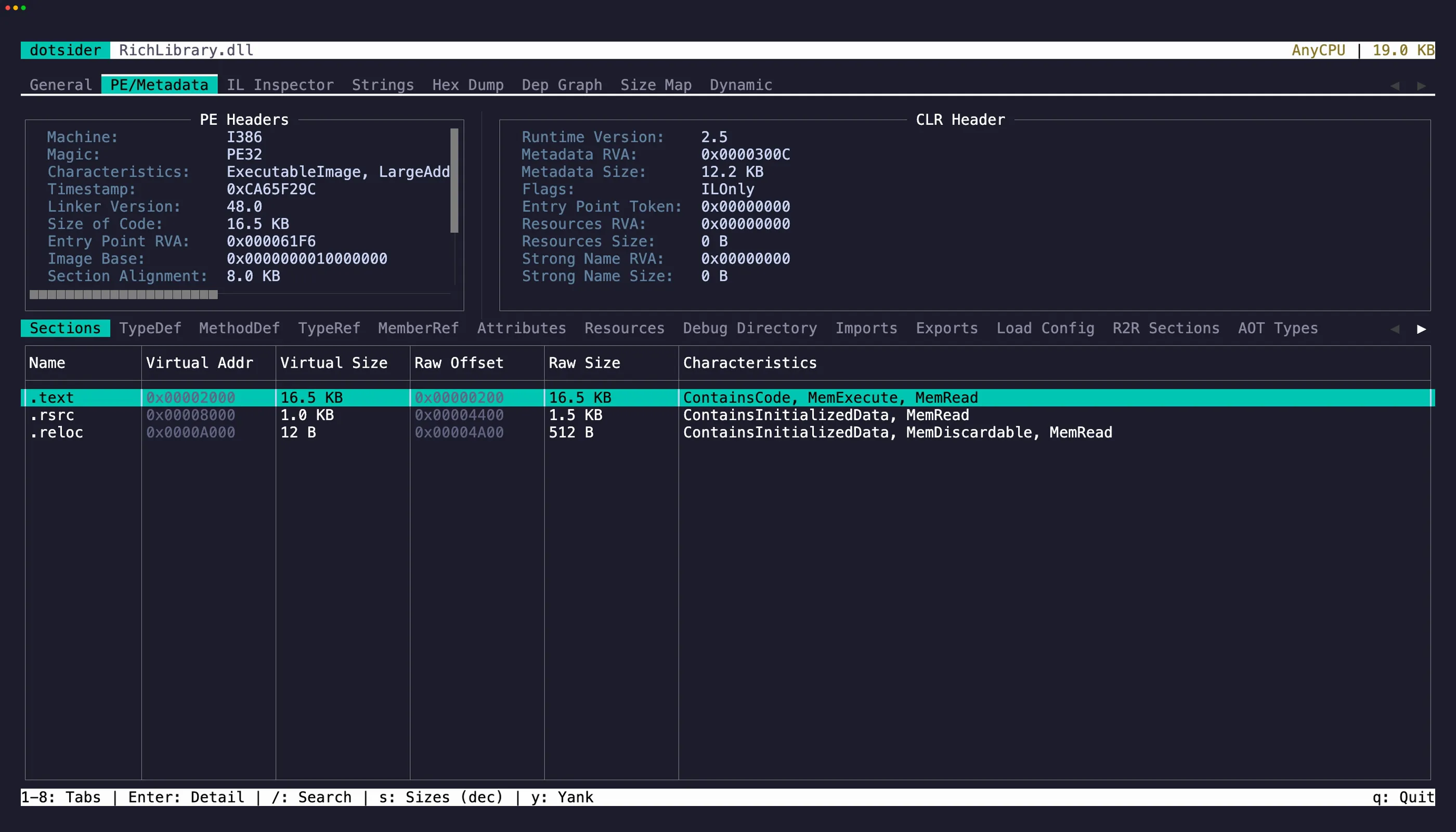
The PE / Metadata tab (2) exposes the raw structure of the loaded file. PE files and Webcil-managed .wasm assemblies show PE headers plus ECMA-335 metadata. Raw dotnet.native.wasm modules use the same tab strip for WebAssembly tables instead of showing misleading PE rows.
- COFF header — machine type, number of sections, timestamp
- CLR header — runtime version, flags, entry point token
- Sections — .text, .rsrc, .reloc for PE files, reconstructed Webcil sections for managed
.wasmassemblies, or standard/custom Wasm sections for rawdotnet.native.wasmmodules - TypeDefs — every type defined in the assembly
- MethodDefs — every method with its RVA and flags
- AssemblyRefs — referenced assembly metadata
- Custom attributes — applied attributes with decoded arguments
- Resources — embedded resources with names and sizes
- Debug Directory — CodeView, embedded portable PDB, checksum, and reproducible-build entries
- Imports — the native import table, one row per imported function with module, hint, and ordinal
- Exports — the native export table, including forwarders and ordinal-only exports
- Load Config — the load configuration directory: security cookie, SEH handler count, and decoded Control Flow Guard flags
- R2R Sections — the ReadyToRun section table of a Native AOT or crossgen2 ReadyToRun image, each region’s id, virtual address, size, and file offset
- AOT Types — types recovered from a Native AOT binary’s embedded metadata; press Enter to see a type’s methods
- Symbols — native symbols with addresses, sizes, and kinds, demangled or named from the binary’s own metadata/symbol sidecars where available; press Enter for the mangled name, aliases, section, and source location
Imports and Exports need no CLR header, so they light up for native apphosts, Native AOT executables, and raw Wasm modules where the metadata tables are empty. They read whichever native format the binary uses: PE import descriptors on Windows, ELF needed libraries and versioned dynamic symbols on Linux, Mach-O loaded dylibs and two-level-namespace bindings on macOS, and Wasm import/export sections. Malformed or cyclic GNU version requirements do not abort ELF analysis; safely decoded undefined symbols remain visible under (unversioned) without trusting the broken library attribution.
For raw Wasm, the sub-tabs are relabeled to describe the module’s own structure: Sections, Types, Functions, Tables, Memories, Globals, Data, Custom, Imports, Exports, Elements, Tags, Module, and Symbols. The section view includes standard sections such as type, table, memory, global, element, code, data-count, data, tag, and custom sections with exact payload offsets and sizes. Every structured vector is bounded by its containing region and the module-wide decoding budget before a collection is allocated; a malformed standard section preserves rows from earlier sections and records its diagnostic in the Module view.
Webcil app assemblies are managed assemblies stored in a WebAssembly-compatible container. dotsider unwraps their metadata and debug directory, so TypeDefs, MethodDefs, resources, IL, embedded portable PDBs, sidecar PDBs, and Source Link behave like a managed DLL even though the file extension is .wasm.
R2R Sections and AOT Types apply to Native AOT binaries. ILC strips ECMA-335 metadata, but every AOT image embeds a ReadyToRun header that locates its runtime regions, and the reflection and stack-trace metadata it keeps still names the binary’s own types and methods — so a stripped binary describes itself. Both work on every platform where the data is file-backed. For a crossgen2 ReadyToRun image the R2R Sections tab lists its classic section table instead (RuntimeFunctions, MethodDefEntryPoints, ImportSections, and the composite tables), each with its id, virtual address, size, and file offset.
Malformed metadata
Section titled “Malformed metadata”Dotsider treats metadata, signatures, and native container headers as untrusted. When an image is otherwise readable, cyclic or excessively nested type relationships and malformed ECMA-335 or ReadyToRun signatures are contained: affected names use token or unknown fallbacks and navigation remains unresolved. Truncated or overflowing PE, ELF, and Mach-O tables and mappings are treated as malformed, and analysis continues with the affected data omitted.
Native AOT type recovery expands each NativeFormat scope, namespace, type, and method record once. A metadata blob may contribute up to 1,048,576 encoded handles, 256 relationship levels, 4,096 bytes per name component, and 16,777,216 decoded or composed name characters. When metadata is cyclic, malformed, or reaches one of these limits, AOT Types keeps the fully decoded prefix and the remaining binary analysis stays available.
ReadyToRun runtime-function tables accept up to 1,048,576 complete architecture-sized records. Method-map NativeFormat containers share a 1,048,576-unit traversal budget across MethodDef array indices, instance-method hashtable buckets, and instance-method entries. Import sections have a separate image-wide budget of 1,048,576 slots. Hot/cold mappings are validated against the accepted runtime-function table before the native method map is built. A malformed or oversized image-wide method table keeps the ReadyToRun header, section listing, and managed metadata available while symbols and correlation report the method map’s diagnostic. Import parsing keeps the complete named prefix when its slot budget is reached, so the remaining disassembly stays available.
Metadata names, recovered strings, IL, symbols, and other artifact-controlled text are rendered through a shared terminal-safe projection. Control and Unicode formatting characters appear visibly in the TUI and human-readable CLI output; JSON retains their exact values.
For Webcil images, section ranges are validated within the containing payload before metadata or IL is exposed. Recognized but corrupt Webcil images are rejected as malformed rather than interpreted as raw WebAssembly.
Symbols reads whichever artifact the platform’s publish produced — a native PDB on Windows, a .dbg ELF sidecar on Linux, a dSYM bundle on macOS, or dotnet.native.js.symbols beside dotnet.native.wasm — after validating or parsing the format-specific identity. ILC’s mangled names are demangled by joining against the binary’s own recovered metadata, so a managed name is marked exact only when the join is unambiguous. ReadyToRun symbols come from the runtime-function map and carry the owning MethodDef token. Wasm symbols come from the Wasm function/code sections, with names layered from the SDK symbol map, the Wasm name section, exports, then synthetic func_N fallbacks. Functions carry their declaring source file and line when the symbol file records them. Without a symbol file, unwind data (.pdata, .eh_frame, or LC_FUNCTION_STARTS) still recovers nameless function boundaries for native PE/ELF/Mach-O binaries — enough for counts and size histograms, though unwind data can miss leaf and thunk functions.
Text selection and copy
Section titled “Text selection and copy”The PE Headers and CLR Header panels are selectable editors. Press Tab to cycle focus between them and the metadata table. Select text and press y to copy. iw and yiw work here too — quick way to grab a single header value. V and yy work for line-level selection and copy.
Press Enter on any metadata table row to open a detail popup. The popup is also a selectable editor — select specific values and press y to yank them.
On table rows, press y to copy the focused row as tab-separated values.
Jump to IL
Section titled “Jump to IL”Select a TypeDef or MethodDef and press g to jump directly to its IL disassembly in tab 3. The IL view opens with that item pre-selected.