Size Regression
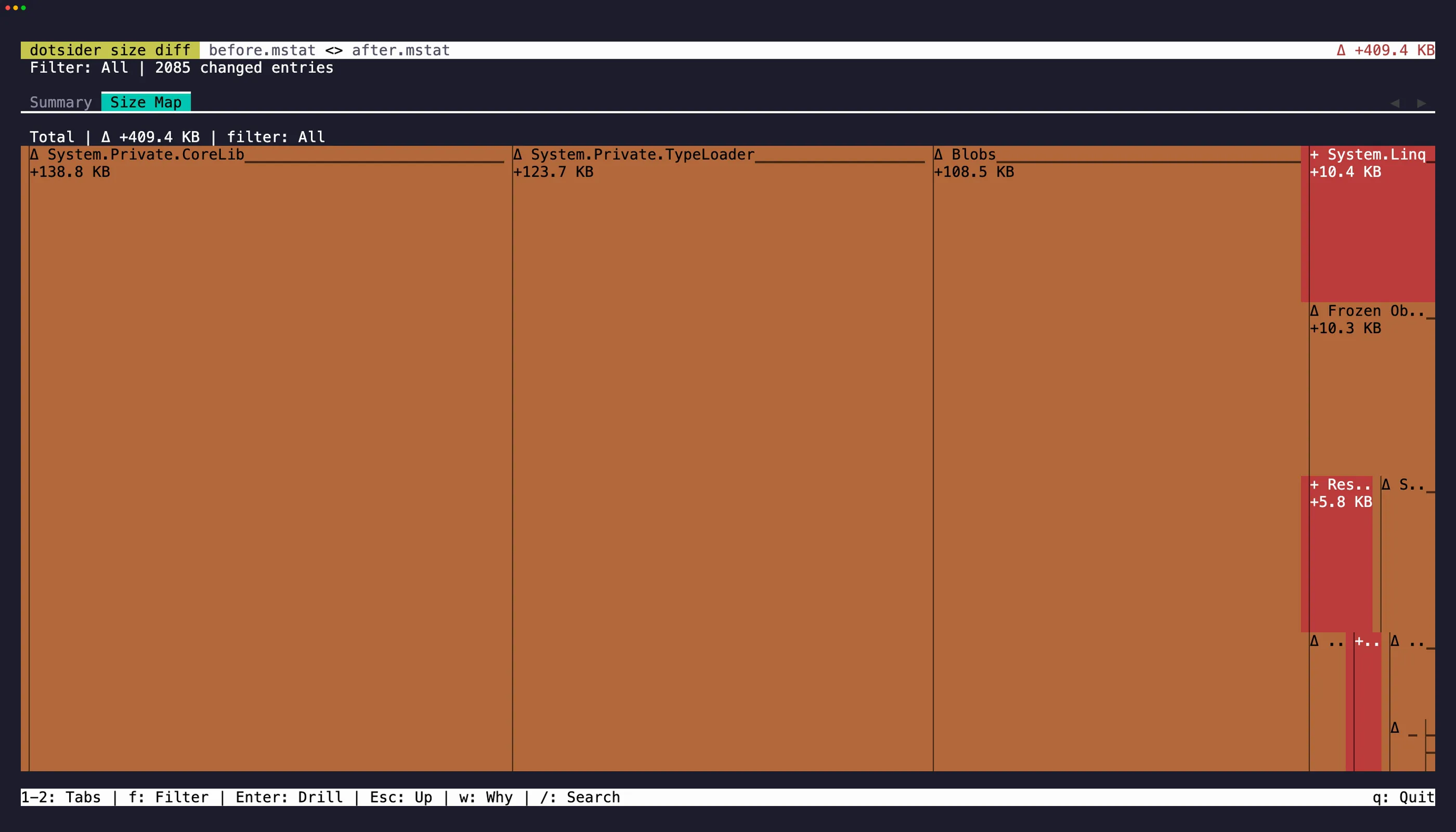
Native AOT binaries grow for reasons the source diff never shows: a new generic instantiation drags in the type loader, a LINQ call materializes a family of enumerator types, a string literal freezes into the image. dotsider turns that into a first-class workflow: diff two builds’ ILC size reports so the regression reads as a treemap, and gate CI on size budgets with the top contributors printed when one breaks.
Publishing the inputs
Section titled “Publishing the inputs”The size report is the .mstat file ILC emits when a project publishes with
IlcGenerateMstatFile; the dependency graph (IlcGenerateDgmlFile) additionally answers
why an entry is in the binary:
<PropertyGroup> <PublishAot>true</PublishAot> <IlcGenerateMstatFile>true</IlcGenerateMstatFile> <IlcGenerateDgmlFile>true</IlcGenerateDgmlFile></PropertyGroup>ILC writes both to the native intermediate directory
(obj/Release/<tfm>/<rid>/native/). Copy them beside the published binary so dotsider’s
sidecar discovery finds them:
<Target Name="CopyAotSidecarsToPublish" AfterTargets="Publish"> <ItemGroup> <_AotSidecar Include="$(NativeIntermediateOutputPath)$(TargetName).mstat" /> <_AotSidecar Include="$(NativeIntermediateOutputPath)$(TargetName).codegen.dgml.xml" /> </ItemGroup> <Copy SourceFiles="@(_AotSidecar)" DestinationFolder="$(PublishDir)" Condition="Exists('%(_AotSidecar.Identity)')" SkipUnchangedFiles="true" /></Target>Every size command accepts either a bare .mstat file or an AOT binary with the sidecar
beside it.
Interactive: the delta treemap
Section titled “Interactive: the delta treemap”dotsider diff before.mstat after.mstatdotsider diff bin/v1/publish/app bin/v2/publish/appTwo mstat-backed inputs open the size-diff TUI — Summary and Size Map tabs — instead of the
managed diff (AOT binaries carry no ECMA-335 metadata, so the managed tabs would be empty
tables). See Diff Mode for the keys and the treemap encoding. Add
--json to skip the TUI and print the machine-readable size-diff document instead.
Headless: dotsider size-check
Section titled “Headless: dotsider size-check”The CI command. It measures a target, optionally compares it with a baseline, renders the
report in text, json, or markdown, evaluates size budgets, and exits non-zero when one
breaks:
dotsider size-check out/pr/app --budget max=25mbdotsider size-check out/pr/app --baseline baseline/app.mstat --top 20dotsider size-check out/pr/app --baseline baseline/app.mstat \ --budget max=25mb --budget growth=1% --budget ns=System.Text.Json:growth=10kb| Exit code | Meaning |
|---|---|
| 0 | Report produced; every error-severity budget passed |
| 1 | Usage or input error (missing file, no mstat, invalid budget) |
| 2 | A budget with error severity was exceeded |
Budget grammar
Section titled “Budget grammar”[scope:]limit(,limit)* — repeatable via --budget:
| Piece | Forms | Notes |
|---|---|---|
| scope | total (default) · ns=<Namespace> · asm=<Assembly> |
ns= covers sub-namespaces: System.Text.Json includes System.Text.Json.Serialization, never System.Text.Json2 |
| limit | max=SIZE · growth=SIZE · growth=PERCENT |
max= caps the current value; growth= caps the change versus --baseline |
| SIZE | 4096, 4096b, 10kb, 25mb, 1gb |
1 kb = 1024 bytes; bare numbers are bytes |
| PERCENT | 1%, 2.5% |
growth only; a brand-new scope (baseline 0) always breaches |
Examples: max=25mb · growth=1% · total:max=25mb,growth=50kb ·
ns=System.Text.Json:growth=10kb · asm=MyApp:max=2mb.
Budget files
Section titled “Budget files”--budget-file budgets.json accepts spec strings and object entries in one document. The
object form is how a team names budgets, downgrades one to a warning (reported, never fails
the gate), or pins a per-budget contributor count:
{ "budgets": [ "total:max=25mb", "total:growth=1%", { "name": "JSON serializer growth", "description": "System.Text.Json tends to bloat via new converters.", "scope": "ns=System.Text.Json", "growth": "10kb", "severity": "warning", "topN": 5 } ]}What the numbers measure
Section titled “What the numbers measure”Every report states its basis. Binaries measure file size on disk (fileSize); a
bare .mstat anywhere in the pair measures mstat attributable totals (mstatTotal) on
both sides so the figures stay comparable — the two differ by headers, alignment, and bytes
the report does not attribute. Namespace and assembly budgets always measure mstat
aggregates: methods, MethodTables, RVA fields, and frozen objects attributed via their
owning type (the code that caused the bytes). Ownerless frozen objects — string literals —
land in an explicit (unattributed) bucket that scoped budgets never draw from but the
aggregates always show, so no byte is silently dropped.
Why did this appear?
Section titled “Why did this appear?”--why attaches the ILC dependency chain for the top added contributors (requires the
target’s DGML sidecar): the root kept X, X kept Y, down to the new entry.
Wiring it into CI
Section titled “Wiring it into CI”GitHub Actions
Section titled “GitHub Actions”Run the same job on pull requests and the target branch. The action keeps its own matching successful branch baseline:
- uses: actions/checkout@v6
- name: Publish NativeAOT application  run: >-    dotnet publish src/App/App.csproj -c Release -r linux-x64    -p:PublishAot=true -p:IlcGenerateMstatFile=true -o out/current
- name: Size gate  uses: willibrandon/dotsider@v0  with:    target: out/current/App    budgets: |      max=25mb      growth=1%
The action selects the release for the runner’s OS and architecture, verifies its SHA-256
sidecar, and caches the result. It writes the Markdown report to the job summary and uploads
the Markdown and schema-versioned JSON reports before enforcing a budget failure. Set
dotsider-version to an exact release for reproducibility, or set dotsider-path to an
existing executable for an offline or custom installation. Give the job actions: read and
contents: read permissions so it can find earlier successful artifacts.
On the first branch run, absolute limits are evaluated and growth limits are named as
deferred. If the job succeeds, Dotsider uploads the binary, resolved .mstat, optional DGML,
and a hashed manifest as the baseline. Later branch runs compare with their preceding
successful run; pull requests compare with the newest successful run of their target branch.
The artifact identity includes the workflow, job, logical target, and detected RID. Set
baseline-key only when the target lives under a randomized temporary path.
For a pull request, Dotsider warns when the managed baseline comes from a different
target-branch commit. The warning shows both commits and the source run, then asks for a
successful size check on the target branch. The size check and budgets still run. current
means the commits match, mismatched means they differ, and unknown means commit details
are unavailable.
This comparison appears for open pull requests with a managed baseline. Branch builds,
explicit baselines, first runs, and closed or merged pull requests leave it empty. The size
check and budgets always continue. GitHub requires actions: read to find baselines and
contents: read to inspect commits.
Supplying baseline remains an explicit override for release-to-release comparisons. It
disables automatic discovery and retention for that action invocation.
Manual and /aot-size reports
Section titled “Manual and /aot-size reports”An on-demand report uses artifacts emitted by the normal build; it does not check out or run pull-request code in the comment workflow. Add this to the normal PR and branch build after publishing:
- name: Upload NativeAOT size input with: name: nativeaot-size-linux-x64 path: | out/current/App out/current/App.mstat out/current/App.codegen.dgml.xml if-no-files-found: errorThen copy the workflow_dispatch and /aot-size template.
It accepts /aot-size in the pull-request conversation or a review comment, verifies that
the author has write access, resolves the PR through GitHub’s API,
downloads the successful PR and base-branch input artifacts, runs Dotsider, and updates a
single PR comment. Change the template’s build workflow, artifact name, target path, and
budgets to match the project.
Azure DevOps
Section titled “Azure DevOps”Run the task after the NativeAOT publish on both pull requests and the target branch:
- checkout: self
- pwsh: >-    dotnet publish src/App/App.csproj -c Release -r linux-x64    -p:PublishAot=true -p:IlcGenerateMstatFile=true    -o $(Build.ArtifactStagingDirectory)/current  displayName: Publish NativeAOT application
- task: DotsiderSizeCheck@1  inputs:    target: '$(Build.ArtifactStagingDirectory)/current/App'    budgets: |      max=25mb      growth=1%
Install the public Dotsider extension from the Azure DevOps Marketplace. The task uses
Node 24 on current agents and retains a Node 20 handler for older supported agents. Its tool
selection, checksum verification, reports, summary, exit meanings, baseline lifecycle, and
typed outputs match the GitHub Action. It uses the pipeline’s short-lived OAuth token to read
successful builds and artifacts from the same pipeline definition, then removes that token
before Dotsider runs. A missing artifact is a first run; authentication, network, and corrupt
artifact failures remain errors. Set baseline only for an explicit override.
Keep checkout: self enabled so Dotsider can identify the target-branch commit from the
local Git checkout. If Azure Repos must look it up through its API, the pipeline Build
Service identity needs repository Read permission. Warnings leave the task successful.
Future baselines come only from successful builds.
See CI integrations for every input and output, platform compatibility, report lifetime, and release policy.
Direct CLI
Section titled “Direct CLI”The marketplaces are optional. An installed Dotsider executable can drive the same gate:
dotsider size-check out/pr/App \ --baseline baseline/App.mstat \ --budget total:growth=1% \ --budget ns=MyApp.Generated:growth=0 \ --format json --output artifacts/dotsider-size-check.json \ --summary-file artifacts/dotsider-size-check.mdRun report-upload steps with the platform’s always condition if the CLI exits 2.
From an agent
Section titled “From an agent”The MCP server exposes the same comparison as diff_size and
check_size_budgets, including inline budget JSON with the object form —
so an agent can ask “does this build pass the team’s budgets” and get the structured report
back.