IL Inspector
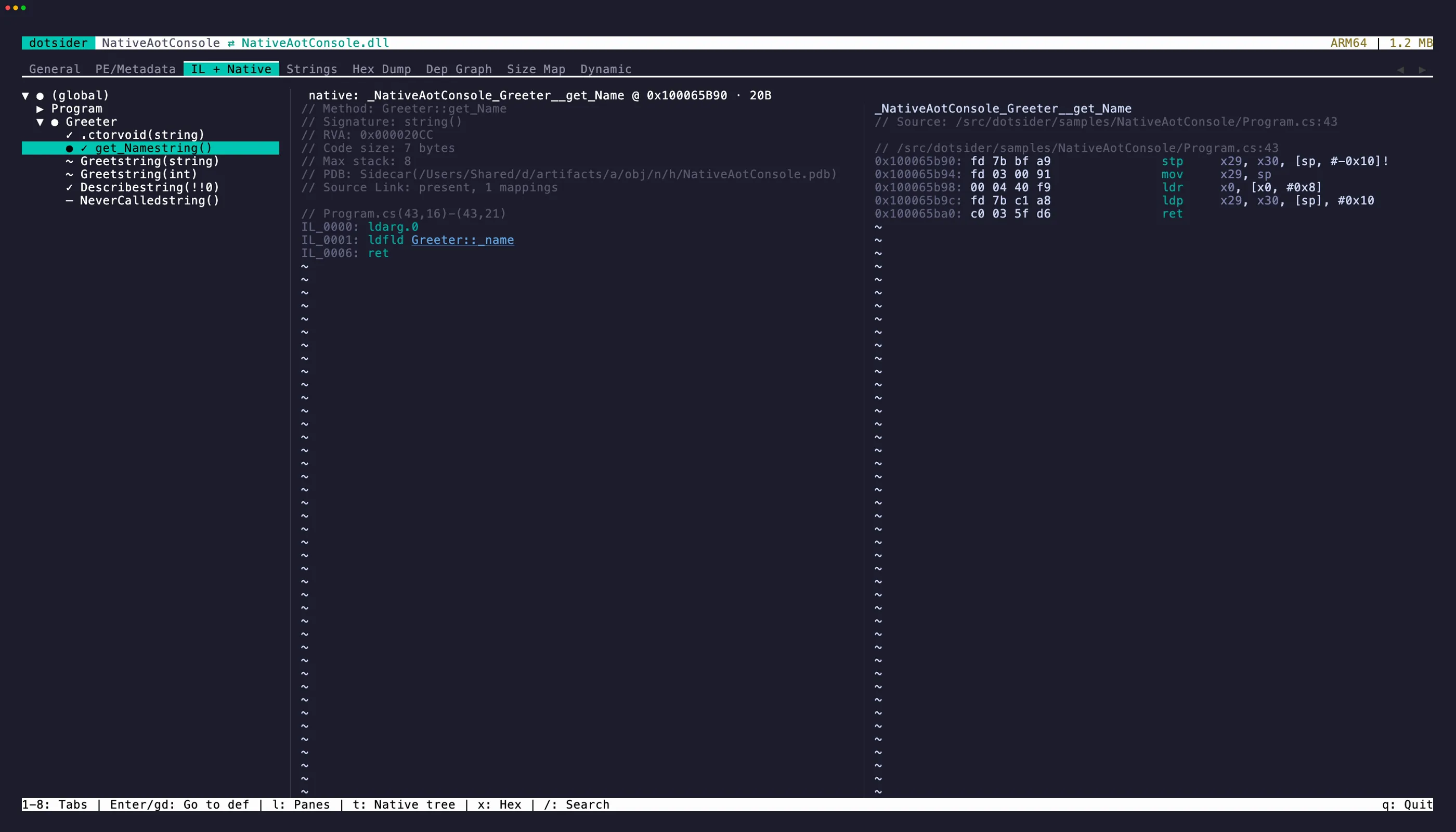
Tab 3 is the IL/native code view. Its label changes with the loaded image: IL Inspector for managed IL, Disassembly for native-only views, and IL + Native when managed IL is paired with native code. For ordinary managed assemblies, it shows a tree of all namespaces, types, and methods. Select a method to see its IL bytecode in the right pane.
Each instruction shows:
- Offset — byte offset within the method body
- Opcode — the IL instruction
- Operand — decoded metadata tokens, string literals, branch targets
When a portable PDB is available, the disassembly also shows PDB provenance, source spans, Source Link markers, and local variable names. Press u on a [source link] marker to copy the resolved URL. Embedded source documents can be opened from selected methods.
Embedded portable PDBs are limited to 256 MiB after decompression, and each embedded source document is limited to 16 MiB. Malformed data, an incorrect declared length, or data beyond either limit is ignored without preventing the assembly itself from opening. A matching sidecar PDB can still supply debug information when the embedded copy is unusable.
Go to definition
Section titled “Go to definition”Press Enter or gd while the cursor is on a token-bearing instruction (call, callvirt, newobj, ldfld, castclass, etc.) to navigate to the target. Navigable operands are underlined.
- Local methods open their disassembly directly.
- External methods resolve the referenced assembly and open it. Reference assemblies like
System.Runtimethat contain no IL are automatically mapped to their implementation (System.Private.CoreLib). Resolution probes the app directory, the .NET shared framework, and any single-file bundles in scope. Type forwarders can also lead to an authenticated sibling.netmodule; missing or mismatched modules remain unresolved. - Fields show the field signature, declaring type, and attributes in the right pane.
- Generic instantiations (
List<int>,Task<string>) unwrap to the underlying open generic type.
Press Esc to go back. The previous IL bytecode, cursor position, tree expansion state, and scroll position are all restored. You can chain multiple jumps and unwind them one at a time.
Cross-tab navigation
Section titled “Cross-tab navigation”- Press
xon a selected method to jump to its body in the Hex Dump tab. The hex view scrolls to the method’s RVA. - Press
oon a selected method to open embedded source when the PDB carries it. - Press
Escto return to where you came from.
Opening embedded source
Section titled “Opening embedded source”Embedded source is copied to a private, uniquely named directory under the system
temporary directory for the dotsider session. Generated names contain only ASCII
letters, digits, _, and -. Known non-script source extensions are retained for
configured editors; unknown, script, and executable extensions are saved as .txt.
Temporary copies are removed during normal teardown when the platform permits it.
VISUAL takes precedence over EDITOR. Native executables and executable Unix
scripts are launched directly without a shell. Unquoted whitespace separates
arguments; single and double quotes group text, adjacent segments join, and empty
quoted arguments are preserved. A backslash escapes whitespace, a matching quote,
or another backslash and otherwise remains literal. Variable, command, and wildcard
expansion, pipes, redirects, and command chaining are unsupported. On Windows, a
resolved local .cmd or .bat editor shim such as VS Code’s code.cmd is invoked
through the system cmd.exe; the embedded-source path is carried as data rather
than inserted as raw command text. A literal double quote inside an argument is
rejected for batch shims because cmd.exe cannot represent that value
unambiguously; quote characters used for grouping are unaffected.
If neither configured editor resolves, dotsider attempts to open a .txt copy with
the platform’s default application. A graphical opener might not be available in a
headless Linux environment; dotsider then displays the safe temporary path instead.
Private copies left by a hard process termination remain subject to the operating
system’s normal temporary-file cleanup.
Select text in the disassembly pane with click-drag or Shift + arrow keys, then press y to yank it to the clipboard. The cursor collapses to the end of the selection and a brief flash confirms the copied range — matching neovim’s yank behavior.
iw selects the word under the cursor (an opcode, a token, a label). yiw copies it directly. iW grabs the full whitespace-delimited token, which is useful for qualified names in operands. V selects the entire instruction line and yy copies it directly.
Search
Section titled “Search”Press / to search method names or IL content. Matches are highlighted in both the tree and disassembly panes.
Native mode (Native AOT and WebAssembly)
Section titled “Native mode (Native AOT and WebAssembly)”Open a Native AOT binary or a raw dotnet.native.wasm module and tab 3 is labeled Disassembly in native mode. Native AOT shows recovered functions bucketed namespace → type → function where symbols can be joined to managed names, plus (runtime), (stubs), and (functions) buckets for the rest. A Wasm module shows SDK function symbols from dotnet.native.js.symbols, the Wasm name section, exports, or synthetic func_N names. Selecting a function disassembles it to real native code for x64, Arm64, x86, Arm32/Thumb-2, RISC-V64, LoongArch64, or Wasm32 on the right, with the same subtle syntax highlighting as the IL pane — address, mnemonic, registers, immediates, and the resolved target comment.
Call and branch targets are resolved to names: a direct call shows call Foo, a target landing inside a function shows Foo+0x12, an intra-function jump becomes a synthesized loc_… label, a RIP-relative load names the referenced data symbol, and an indirect call through the import table resolves to MODULE!Function. Wasm direct calls resolve by function index to imported or defined function names; indirect calls name their type/table operands, and local/global/table operands are annotated from the parsed standard sections when the module records enough type information. Where the debug sidecar carries line data, // file:line annotations mark the source.
Webcil app assemblies such as _framework/MyApp.wasm are not shown in native mode. They unwrap to managed metadata, so tab 3 remains IL Inspector and the tree, IL, PDB, locals, Source Link, and go-to-definition behavior match a normal managed DLL.
Enter on a resolved call/branch jumps to that function (the target is underlined to signal it’s navigable); Esc returns. x jumps to the function’s bytes in the Hex Dump. The Size Map and the PE/Metadata Symbols sub-tab cross-navigate into the native listing.
ReadyToRun images
Section titled “ReadyToRun images”A ReadyToRun (crossgen2) image keeps its full metadata, so tab 3 is labeled IL + Native and the tree stays in its managed namespace → type → method shape. A glyph marks each method: ✓ precompiled, – IL only (not in this image). Selecting a precompiled method splits the right pane — IL on the left, its native code ranges (hot, funclets, cold) on the right — with call targets resolved through the import tables (call Console.WriteLine, call WriteBarrier, a generic instantiation named with its type arguments). A composite *.r2r.dll shows its component assemblies in the tree and navigates across them; a component DLL disassembles from the owner composite it belongs to.
Pre-ILC sidecar correlation (Native AOT)
Section titled “Pre-ILC sidecar correlation (Native AOT)”Publishing a Native AOT binary leaves its pre-ILC inputs behind in the build tree — the managed assemblies ILC compiled (root plus local project references), their portable PDBs, and the .mstat/.dgml size and dependency sidecars. When you open an AOT binary, dotsider probes for them (following the .ilc.rsp response file first, then the obj\<cfg>\<tfm>\<rid> layout, then a sibling assembly) and, if it finds an attachable managed assembly, offers to attach it:
Native AOT Sidecars Detected … Enter: Attach | Esc: No, native onlyPress Enter to attach or Esc to stay native-only. When attached, the metadata tabs (PE/Metadata, Strings, General references) fill from the managed assembly while the binary tabs stay native, and tab 3 is labeled IL + Native so a method’s IL and native code can show side by side.
- The tree shows correlation markers:
✓correlated exactly,~shared with overloads (ambiguous),±size-only (mstat evidence but no native symbol),–not in the native image (trimmed or inlined). - Selecting a correlated method splits the right pane: pre-ILC IL on the left, native disassembly on the right, with call targets named from the companion metadata. A status line reports the native address and size.
- Overloads that ILC’s mangling collapses are reported as ambiguous with the shared size, never guessed apart. A generic method with several instantiations shows every native symbol.
ttoggles between the managed and native tree; the tab label switches between IL + Native and Disassembly with that mode.lcycles focus between the IL and native panes (and swaps the visible pane when the terminal is too narrow to split);Tabsteps tree → IL → native. Search (/) follows the focused pane.xopens the Hex Dump at the correlated symbol’s file offset.- On the General tab,
are-opens the offer andddetaches; the tab also reports the correlation counts ({exact} of {total} methods in native image).
The same correlation is available headlessly:
- CLI:
dotsider analyze <binary>prints the cheap probe summary without attaching;dotsider analyze <binary> --correlateprints the correlation counts;--correlate Type.Methodor--correlate 0x<address>prints the method’s IL beside its native code. An ambiguous name lists every candidate and exits non-zero. - MCP: the
correlate_methodtool (and thepreIlcsummary onget_assembly_info) expose the same data over a session or a file path. - Session socket: the
correlate-methodcommand answers the same query against a running instance.